Fluid360, a layout check by width, one device at a time, by Tech Talker 360
One script tag shows your own page at phone, tablet and desktop widths, one device at a time, and finds the element that makes it scroll sideways.
It is for developers who check their own page at several widths while they build it. Each frame loads the real page at that size, in the browser you already use, so media queries, container queries and vh units work as they would in a window of that size.
Try it
The button loads the tester on this page and opens it, so you see this page at three widths, one device at a time. The tabs above the device switch between them. Press Escape or Close to come back here.
Add it to your page
Put this tag in your page's head. A version folder never changes, so the tag carries a hash, and the browser refuses a file that does not match it.
<script src="https://cdn.techtalker360.com/fluid360/v2.0.0/fluid360.js"
  integrity="sha384-SGcSa2nWK2GAMeOuk9T9W5tVTwf0k5T3P0kWU8HEpTpF5ajKOjVx7aCTYe7iWIOA" crossorigin="anonymous" defer></script>
The /fluid360/latest/ folder always holds the newest release. Its file changes with each release, so load it without a hash:
<script src="https://cdn.techtalker360.com/fluid360/latest/fluid360.js" defer></script>Then open your page on localhost and press Check widths in the bottom corner, or Alt+Shift+V. Remove the tag before your page goes to production.
Options
Every option is a data- attribute on the same script tag, and all of them are optional. A bad value never breaks your page: it is ignored, and on a host where the tester starts, the console shows a warning. In a list, such as data-widths or data-hosts, the good items are kept and the bad ones dropped. When no good item is left, or for any other option, the default is used.
| Attribute | Values | Default | What it does |
|---|---|---|---|
data-widths | 1 to 4 frames, each W or WxH in CSS px (W 240 to 2560, H 320 to 2560) | 390x844,820x1180,1440x900 | The frames the panel opens with, in the order of their tabs. A width alone takes the height of the preset with that width, or else 900. With more than 4, the first 4 are used. |
data-open | true, false | false | Opens the panel as soon as the page has loaded. |
data-shortcut | A modifier plus a letter or digit, such as alt+shift+v, or off | alt+shift+v | Opens and closes the panel. Use at least one of Alt, Ctrl, Shift or Meta, but not Shift alone. A combination the browser keeps for itself, such as Ctrl+T, is refused. off turns the shortcut off. |
data-launcher | start, end, none | start | Puts the Check widths button in the bottom start or end corner, or leaves it out. With none, use the shortcut or the API. |
data-hosts | Host names, *.example.com, or * | none | More hosts where it starts by itself, besides the development hosts. |
data-sync-scroll | on, off | on | Whether Sync scroll starts on. While it is on, scrolling one frame scrolls the others to the same share of their height. |
data-sync-links | on, off | on | Whether Sync links starts on. While it is on, following a link in one frame loads the same address in the others. |
data-deprecation-check | true, false | false | Warns you in the console when the version you pin is deprecated. See Versions. |
data-sandbox | Sandbox tokens, such as allow-scripts allow-same-origin | none | The sandbox attribute of every frame, set before its first page. A token the HTML standard does not define is dropped, and so is every allow-top-navigation token. With no token left, the frames get an empty sandbox, every restriction on. allow-scripts with allow-same-origin isolates only a frame of another origin: a page of your own origin can remove its own sandbox. See Other sites. |
data-allow | A Permissions Policy, such as fullscreen; clipboard-write | none | The allow attribute of every frame, set before its first page. A directive that does not start with a feature name is dropped. |
For example, three frames of your own, the button in the end corner, and links that stay in their frame:
<script src="https://cdn.techtalker360.com/fluid360/latest/fluid360.js" defer
  data-widths="360,768x1024,1280" data-launcher="end" data-sync-links="off"></script>
What you change in the panel (the frames, Fit or 100%, and both switches) is saved in your own browser, for your own site, and wins over data-widths, data-sync-scroll and data-sync-links. Nothing is sent anywhere. Reset settings, in the panel's Help, goes back to the tag's options.
The API
For frameworks, and for pages that open the tester from their own code, window.Fluid360 has these:
| Call | What it does |
|---|---|
open(options) | Opens the panel. options is optional: options.widths takes the data-widths form, and options.url loads another address in the frames. options.sandbox and options.allow override data-sandbox and data-allow. For both, '', null and false mean not set, and options.checkFraming takes your own framing check. See Other sites. |
close() | Closes the panel and puts the focus back where it was. |
toggle() | Opens the panel, or closes it when it is open. |
version | The version of the package that is running, as text. |
Fluid360.open({ widths: '360,1280' })A call to open() works on any host. The guard below stops only what starts by itself: the button, the shortcut and data-open.
Other sites
A page from another origin in options.url shows in the frames, but the browser keeps it closed to the tester. The panel then shows one note: Sync scroll, Sync links and Find overflow are off, because these frames show another site. To use them, add Fluid360 to that site and open it there. Those three controls stay in place, unavailable, with the note as their reason. No frame shows its own can't-be-read notice, and the badge shows the width only. A sandbox without allow-same-origin keeps even your own pages closed to the tester, so the same note shows, saying the sandbox leaves out allow-same-origin.
Escape and the shortcut don't reach the panel while focus is in a frame the tester can't read, such as a page of another origin. Click outside the frame, or press the panel's Close button.
A development or staging page of your own that shows other sites you work on, such as your app's other domains, would sandbox the frames with this token set:
Fluid360.open({ url, sandbox: 'allow-scripts allow-same-origin allow-forms allow-popups allow-popups-to-escape-sandbox' })Scripts, forms and popups keep the framed site usable, and a popup it opens is a normal tab. Top navigation is left out on purpose, and the tester refuses its tokens: without it a framed page can't send the whole tab elsewhere, so you never lose the panel and the page under it.
A site can refuse to be framed with X-Frame-Options or frame-ancestors, and your page can't read that from the browser. Pass options.checkFraming, a function that takes the address and answers 'allowed', 'refused' or 'unknown', at once or as a promise. It might ask your own server for that address's headers. That server check fetches any address it is given, so guard it against server-side request forgery: accept only http and https, refuse private, loopback and link-local targets, follow no redirects, and send a HEAD request. The tester asks it before it shows an address of another origin, again on Reload, and when a frame of your own origin follows a link to another one. On 'refused' the frames say the page refuses to load in a frame, instead of staying blank. A throw, a rejection, any other answer, or no answer within 5 seconds counts as 'unknown', and the frames show as they are. Addresses of your page's own origin are never passed to it: the tester reads their headers itself.
Presets
| Preset | Size (W x H, CSS px) |
|---|---|
| Phone | 390 x 844 |
| Tablet | 820 x 1180 |
| Desktop | 1440 x 900 |
| Custom | Any size you type in the panel |
The panel holds 1 to 4 frames. Type a width such as 360, or a size such as 360x780, in Width (px), then press Add frame. Each frame has a Landscape button that swaps its width and height. A frame whose size matches a preset either way takes the preset's name. Any other size is Custom.
One device
The panel shows one frame at a time, inside a plain drawn device that the frame's width picks: a phone under 600 px, a tablet from 600 to 1099, a laptop from 1100 to 1399, and a monitor from 1400. Landscape turns a phone or a tablet, and a laptop frame turned taller than wide shows as a monitor turned to portrait. The drawing only frames the page: it is still width and height only, and not a device test.
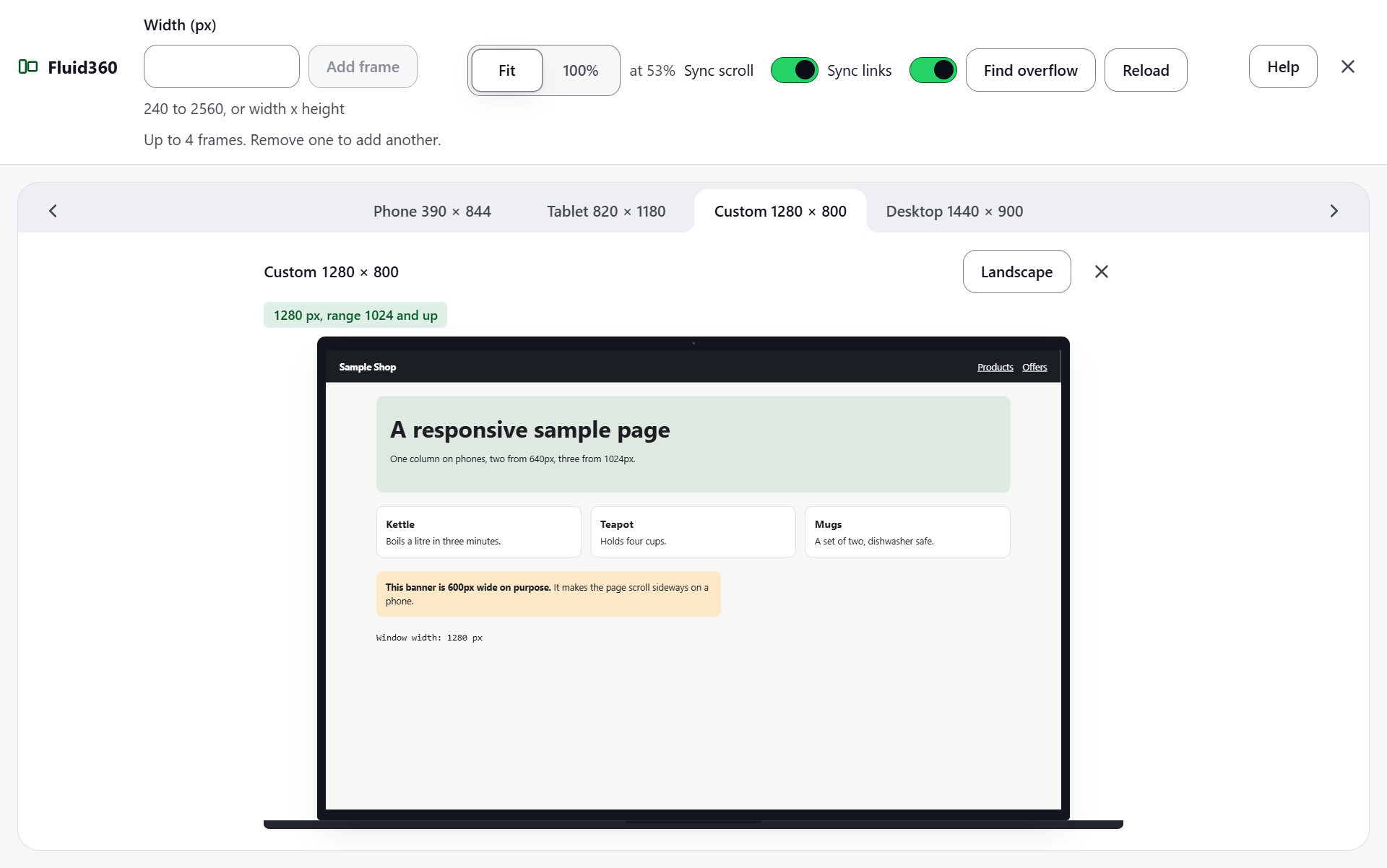
A row of tabs above the device, one per frame, picks the frame on show, with Previous and Next beside it. On the tabs, the Left and Right arrow keys move between frames and wrap, and Home and End go to the first and the last. The other frames stay loaded at their real size, out of sight, so Sync scroll, Sync links, Find overflow and the badges keep working, and switching frames reloads nothing. Lazy images and other content in a hidden frame that waits to be scrolled into view load when that frame comes on show.
2.0.0 removed the View switch and the view that showed every frame in one row, so One device is the only view. A page set up for 1.x moves by changing only the version folder and hash in its script tag, or by loading latest/. data-view is then ignored with one console warning, options.view in open() with one warning each time it is given, and a view choice that 1.2.0 saved is removed when the panel opens.
Development hosts only
The button, the shortcut and data-open start only on development hosts, so a tag left in by mistake shows your visitors nothing. These count as development hosts:
localhost,*.localhost,127.0.0.1and the rest of127.0.0.0/8, and[::1]*.test,*.local,*.internal,*.exampleand*.invalid- private addresses:
10.0.0.0/8,172.16.0.0/12,192.168.0.0/16andfc00::/7
On any other host it adds nothing to the page and writes one line to the console, with the data-hosts value that would start it there, such as data-hosts="staging.example.com". A file: page is not supported, because the frames can't be read there. Open the page from a local server instead.
Remove the tag before production. The guard only covers a tag you forget to remove.
Overflow finder and breakpoint badge
Under each frame's label, a badge shows the frame's width and the range of your page's own width breakpoints it falls in, such as 390 px, range 0 to 639. The breakpoints come from the min-width and max-width conditions of your @media rules, the range syntax included.
Find overflow checks every frame and lists the elements that reach past its width and make the page scroll sideways. Each result shows a selector, such as div.hero > img, and how far past the edge it goes, such as +48 px. When the cause is clear, it names it: a fixed width, a long word or URL, a wide image, video or embed, or a negative margin.
Choose a result to scroll that frame to the element and outline it. The outline is drawn over the frame, and your page's DOM and styles are never changed. A frame with nothing too wide says No sideways scroll at 390 px. When the page scrolls sideways but no single element explains it, the list says how far it scrolls.
Messages in a frame
When a frame can't show your page, or can't be read, the frame says why. Each message, and what to do about it:
| Message | What to do |
|---|---|
| This page refuses to load in a frame. | Your server sends X-Frame-Options: DENY, or a frame-ancestors rule without 'self'. Allow 'self' while you develop, then press Reload. |
| The page's Content Security Policy blocks frames. | Add 'self' to frame-src while you develop. If your policy has no frame-src, add it to child-src or default-src. |
| This page refuses to load in a frame on this site. | A page of another origin, which your options.checkFraming says refuses framing. Its server's X-Frame-Options or frame-ancestors rule leaves your site out, and only that site can change it. |
| This page's Content Security Policy blocks frames from another origin. | The message names that origin. Add it to your page's frame-src. |
| This frame has not loaded after 15 seconds. | Check that the page loads in a tab of its own, then press Reload frame. On an https page that is not itself on a loopback host, a frame on one (localhost, *.localhost, 127.0.0.0/8 or [::1]) may be waiting for you to let the page reach apps on this device, and the message says so. |
| This frame left your site. | A link took the frame to another origin, where sync and the overflow finder can't work. Press the button that names the page it left, such as Back to /about, to return. |
| This frame can't be read, so sync and the overflow finder are off for it. | The page in it is sandboxed, or comes from another origin. It still shows; load one of your own pages to read it again. |
| Some styles can't be read | Shown on the badge. A stylesheet from another origin can't be read without CORS, so its breakpoints are left out. Serve it from your own origin, or with CORS, to count them. |
Limits
- Width and height only. It is a layout check, not a device test. It does not copy a phone's user agent, pixel density, touch, hover, iOS Safari or a mobile address bar.
- Frames run the real page. A form sent in a frame is sent for real, and a frame of your own origin shares your page's cookies and storage.
- Your page's Content Security Policy needs
frame-src 'self'(orchild-srcordefault-srcwith'self') so the frames can load, and the other site's origin there too for anoptions.urlof another origin, and ascript-srcthat allowshttps://cdn.techtalker360.com. It makes no request other than the frames and one request to your own page for its headers. Withdata-deprecation-check="true"it also fetches/fluid360/versions.jsonfrom this site, which needs aconnect-srcthat allowshttps://cdn.techtalker360.com. - Your own origin only. Sync scroll, sync links, the badge and the overflow finder read each frame from outside, so they work only on pages of your page's own origin. For another origin, see Other sites.
- Made for desktop browsers. It works on a touchscreen, but a phone has little room for several frames.
Versions
A version folder never changes once it is up, so pin one when your page must stay the same. The latest folder always holds the newest release, across major versions too. When a new major version comes out, the whole major line before it is marked deprecated that day, and its folders stop loading one year later with HTTP 410 Gone. /fluid360/versions.json lists every version with its release date and status, the same as the table below. The files of a deprecated version also send Deprecation, Sunset and Link headers that point to this table.
To get a console warning when your pinned version is deprecated, add data-deprecation-check="true" to the script tag. On a host where the tester starts, it then fetches /fluid360/versions.json once per page load, without cookies, and warns once if your version is deprecated. The check is off by default, and it never runs from /fluid360/latest/.
| Version | Released | Status | Folder |
|---|---|---|---|
| 2.0.0 | Current | /fluid360/v2.0.0/ | |
| 1.2.0 | Deprecated, works until | /fluid360/v1.2.0/ | |
| 1.1.0 | Deprecated, works until | /fluid360/v1.1.0/ | |
| 1.0.0 | Deprecated, works until | /fluid360/v1.0.0/ |
License
Fluid360 is not open source: its source is proprietary and unpublished. © 2026 Tech Talker 360. All rights reserved. The built file you load from this CDN carries a license of its own, and these are its terms in short.
You may load the file from https://cdn.techtalker360.com and use it on any website or application you operate, including one you run as a business or charge your own users for. Setting it up with the options on this page is part of that use. No fee or permission is needed.
You may not change the file, or copy, re-host, mirror or redistribute it anywhere. Nor may you sell, rent or sublicense it, offer it to others as a tool, component, library or service, remove or alter its notices, brand, name or version markers, or present it as your own work.
For anything beyond that, ask first at techtalker360.com. The full text ships in every release folder as LICENSE, and the terms carry no warranty and no guarantee that any address stays online. The license page shows the current text for every library on this CDN. The copy in each release folder governs the files of that release.